FreeCAD is free open-source CAD software for designing real objects in 3D, from a printed bracket to a piece of furniture.1 It is for hobbyists, students, teachers and people doing product design, mechanical work or architecture.1 The sizes stay as numbers you can change, and the model rebuilds. There is no account and no licence fee, and the application does not collect personal data.13
Last checked October 28, 2026.
At a glance
- What it is: A free parametric 3D modeller. Parametric means the sizes are numbers you can edit, and the shape updates.1
- Works on: 64-bit Windows 10 or newer, macOS 12 Monterey or newer (Apple Silicon and Intel), and Linux.2
- Price: Free to download, use and share, including commercial work. No account and no paywall.14
- Licence: Source code is LGPL version 2 or later. Documentation and the website are Creative Commons Attribution 3.0.4
- Best for: Precise parts on your own computer.
- Official site: freecad.org
What FreeCAD does (and how it protects your privacy)
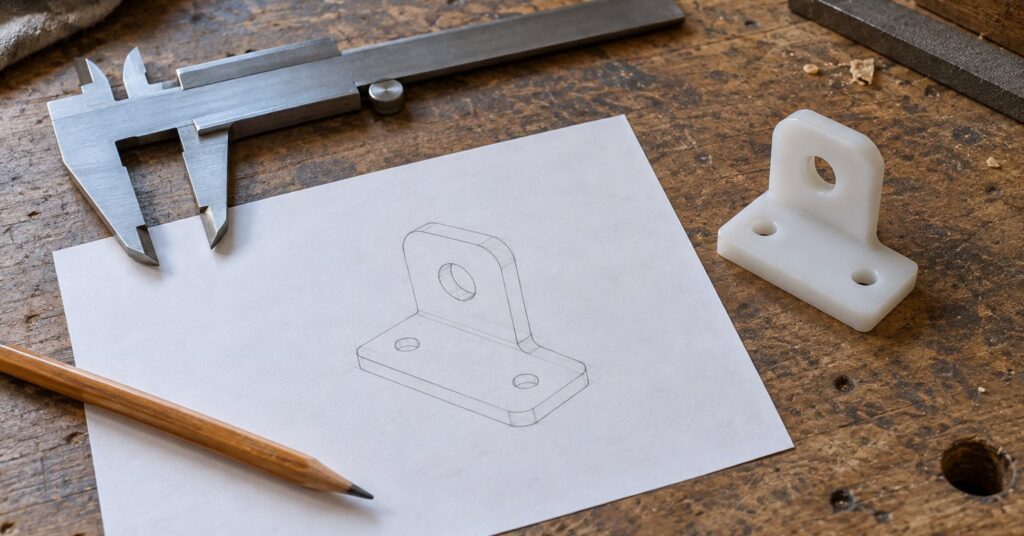
FreeCAD is a desktop program for models that have to be the right size. You sketch a flat shape, lock the measurements with constraints, then turn that sketch into a solid. A constraint is a rule such as “this edge is 40 mm” or “these lines stay parallel.” Parametric modelling means you go back into that history, change a number, and the later steps rebuild.1 The project describes it as a way to design real-life objects of any size, and to make drawings from the 3D model.1
Tools sit in workbenches. A workbench is a set of tools for one job, such as a sketch, a mechanical part or a building.5 Part Design, with the Sketcher, is the usual start for a single part. A BIM workbench (building information modelling) covers architecture.5
A design is a file on your computer. The application does not collect personal data, there is no sign-up, and the public source code can be checked for that.134 The models you produce are yours.4
Key features of FreeCAD
- Editable dimensions: Change a parameter in the model history and the design updates.1
- Constrained sketches: Draw a closed 2D shape and use it as the base of a 3D object.1
- Pads and pockets: Give a sketch thickness, or cut a second sketch out of the solid. Editing the sketch rebuilds the part.5
- Drawings: Take dimensions and other details from the 3D model into a production drawing.1
- Open formats: Reads and writes STEP, IGES, STL, SVG, DXF, OBJ, IFC, DAE and others.1
- Add-ons: Extra workbenches and macros install from the Addon Manager inside the program.2
- Python scripting: A built-in console can create or change geometry. Python is a programming language. Macros are short scripts.5
- Three desktops: Official builds cover Windows, Mac and Linux. Many Linux distributions also offer it in their package manager.25
FreeCAD pros and cons
Pros
- Free for private, commercial or institutional use, with no contract and no forced update.4
- No account, no paywall and no advertising in the application.13
- The design file belongs to you, and you choose the owner and the terms.4
- The current stable release is 1.1.4, released on 28 September 2026.29
- Windows and macOS builds are signed by The FreeCAD Project Association, the non-profit seated in Belgium that supports the project.78
Cons
- The learning curve can be steep, especially on a first try at 3D modelling.5
- Downloads are 64-bit desktop builds. Windows 10 is the oldest supported Windows, and macOS 12 Monterey is the oldest supported Mac system.2
- The Draft workbench does not include the full tool set of a dedicated 2D CAD program.5
- Add-on workbenches are not checked for malicious content, and a macro from someone else can do anything you can do on the computer.3
- Releases before 1.1.4 are affected by two file-handling problems that a crafted project file can trigger.7
Is FreeCAD safe and private?
The privacy policy says the application does not collect, transmit, share or use personal data, and that it has no ads or trackers.3 Logs, settings, cache, thumbnails and recent files stay on the computer.3 The in-app manual loads over HTTPS, and saving or opening a file on a remote server can share your IP address.3 A project file can store a folder path that includes a user name, so check that before you share it.3
Telemetry is a separate add-on, not part of a normal install. You add it yourself in the Addon Manager, and the project says it will not turn reporting on by default.6 If you install it, it sends preferences, including customisations, plus platform, architecture, the list of installed third-party add-ons, and notes of incorrect shutdowns.6 The project calls that non-identifying and assigns a random identifier. It says it uses PostHog and that the data is retained in the EU, and that the FreeCAD Project Association stewards it. Uninstalling the add-on stops the reports.6
Use 1.1.4, the last planned maintenance release in the 1.1 series. It fixes two file-handling flaws that a malicious FCStd file can trigger. FCStd is FreeCAD’s project file, and every earlier release is affected.7 The project does not vouch for unofficial builds.3 The FreeCAD Project Association is an international non-profit seated in Belgium, created in November 2021 and registered as an AISBL, to support the project. Source code is on GitHub, with mirrors on GitLab, Codeberg and SourceForge.28
How to get started with FreeCAD
- Download FreeCAD 1.1.4 from the official download page.2 It was released on 28 September 2026.9 Weekly builds are not for production use.2
- Install the 64-bit Windows installer, the Apple Silicon or Intel macOS disk image, or the Linux AppImage.2 Many Linux distributions also package FreeCAD. Prefer a build the download page lists.35
- For a small part, switch to the Part Design workbench. It uses the Sketcher for the flat outline.5
- Create a sketch, draw a closed shape, close the sketch, and use Pad to give that shape thickness.5
- Change a constraint, or the pad distance. The solid updates from the model history.5
- Save in a folder you control. File, then Project information, can name an owner and your own terms.4 Before you share the file, check that its folder path does not show a user name.3
- Install add-ons and run macros only from authors you trust.3 If you already have an older FreeCAD, update to 1.1.4 before opening files from other people.7
Who should use FreeCAD (and who might prefer something else)
FreeCAD fits a measured object on your own computer: a replacement clip, a workshop jig, furniture whose sizes will change, or a simple building. It also fits a class or a small workshop that does not want a subscription or an account.14 If you already use OpenSCAD, FreeCAD includes an OpenSCAD workbench.5 You can also stay with OpenSCAD.
The getting-started guide sets FreeCAD apart from software made for animation and film.5 For sculpting, animation and finished pictures, Blender is the wider 3D workspace. For logos and other flat drawings, Inkscape stays in 2D. FreeCAD can still write SVG and DXF when a flat outline needs to leave the model.1
Frequently asked questions
Is FreeCAD free?
Yes. You can download, use and share it free of charge, including for paid work, with no sign-up.14 The files you make are yours. Donations to the project association are optional.48
Is FreeCAD safe?
The application does not collect personal data and has no ads or trackers.3 Install 1.1.4, because earlier releases are affected by two file-handling flaws in crafted project files. Trust add-ons and macros only from authors you trust.37
Does FreeCAD work on Mac, Windows or a phone?
Official builds are 64-bit Windows 10 or newer, macOS 12 Monterey or newer for Apple Silicon and Intel, and Linux.2 The download page is the list of official packages.3
Does FreeCAD upload my designs?
It does not transmit personal data. If you choose to open or save a remote file, your IP address can be shared as part of that connection.3 Usage reports come from an optional add-on.6
Sources
- FreeCAD: Your own 3D parametric modeler
- FreeCAD: Download
- FreeCAD: Privacy policy
- FreeCAD documentation: License
- FreeCAD documentation: Getting started
- FreeCAD News: FreeCAD Telemetry addon is now available
- FreeCAD on GitHub: Release 1.1.4
- FreeCAD Project Association: About the FPA
- FreeCAD News: FreeCAD 1.1.4 released